How to Find Cheaper Printings of the Magic Cards You Want

How to Find Cheaper Printings of the Magic Cards You Want
As someone who loves Commander, I've always faced the same frustrating problem: building the decks I want to play is expensive. Really expensive. Whether it's a cool deck I saw online, a brew inspired by a new legendary creature, or just upgrading my existing decks, the price always seems to add up faster than I expect.
I remember wanting to build a Prosper deck and being excited about the strategy. Then I checked the price and... well, let's just say my wallet didn't share my enthusiasm. That's when I realized most of that cost wasn't coming from the expensive cards themselves - it was coming from expensive printings of cards that have cheaper versions available.
Understanding Why Some Printings Cost More
Before diving into solutions, it's worth understanding why card prices vary so much between printings. The biggest factors are:
- Age and nostalgia - Older printings often carry premium prices
- Scarcity - Some sets had smaller print runs or limited availability
- Border and frame differences - White borders are typically cheaper than black borders
- Foil availability - Some older cards were never printed in foil, making foil versions extremely expensive
- Set popularity - Cards from beloved or competitive sets often cost more
The key insight is that unless you specifically care about the artwork, frame, or nostalgic value, you can get the exact same gameplay for a fraction of the cost by choosing the right printing.
This got me thinking about other deck building tools out there. Moxfield has a "change to cheapest printings" feature, which is decent as a starting point, but it's really limited compared to what players actually need.
Here's what frustrated me about Moxfield's approach:
- You click a button, it does something in the background, and your deck just changes - you have no idea what happened
- There's no way to preview what will change before it happens
- You can't choose foil preferences - it just picks whatever is cheapest
- You can't exclude card types you don't want (like white borders)
- It doesn't consider your collection at all - it might "optimize" cards you already own
- If you don't like the result, you're stuck manually reverting changes
I wanted something much more sophisticated that would give me complete control over the optimization process and let me see exactly what would change before I commit to anything.
Building a Better Price Optimization Tool
The deck price optimization feature I built for MythicHub solves all these problems and goes way beyond just "find the cheapest version." Here's what makes it much more sophisticated than Moxfield's basic approach:
Choose Your Foiling Strategy
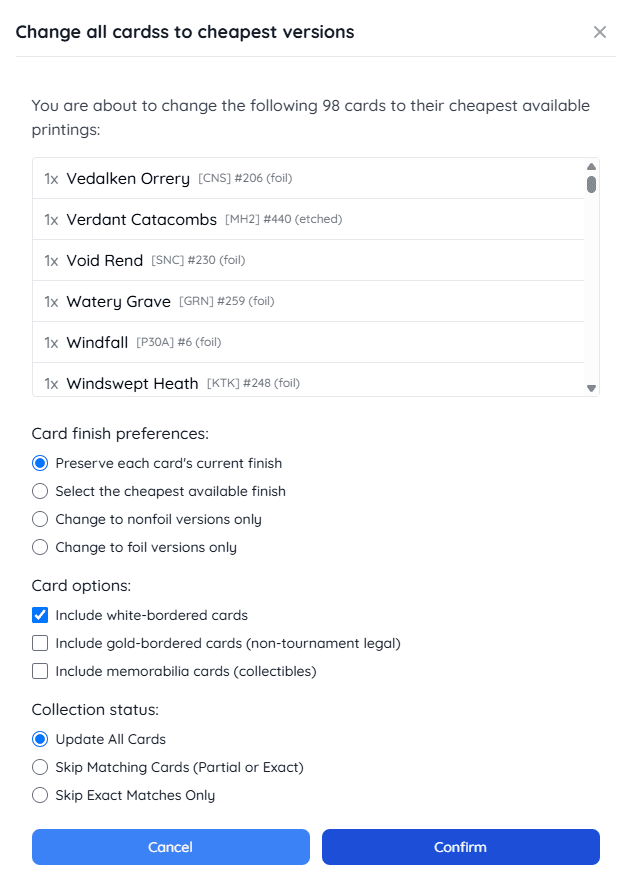
One of the coolest parts is the finish options. Understanding foil pricing helps you make smarter choices - foil versions typically cost significantly more than nonfoil, but sometimes older foils are actually cheaper than recent nonfoil printings due to reprints. You can choose exactly how you want to handle foils:
- Find the cheapest option overall - This considers both foil and nonfoil versions and picks whatever is cheaper. Sometimes a foil version is actually cheaper than the nonfoil!
- Keep current finishes - If your deck already has a mix of foils and nonfoils, this preserves that choice while finding cheaper printings
- Go full nonfoil - Perfect for budget builds where you want to avoid foil premiums entirely
- Go full foil - For when you're building your dream deck and want everything shiny
Border and Card Type Options
Magic has printed cards with different borders over the years, and understanding these differences can save you money. The optimization lets you choose:
- White bordered cards - These are usually significantly cheaper than black border versions from the same era, but some players avoid them for aesthetic reasons
- Gold bordered cards - These aren't tournament legal but can be great for casual play, often costing much less than regular versions
- Memorabilia cards - Special collectible versions that might not be appropriate for all decks
Being able to include or exclude these gives you control over the final look and legality of your deck. For budget builds, including white borders can lead to substantial savings with minimal impact on gameplay.
Collection Integration: The Game Changer
This is where things get really smart. If you're logged in and have your collection set up, the optimization can consider what you already own:
- Update All Cards - Optimize everything regardless of what you own
- Skip Cards I Already Have - Only optimize cards you don't own (exact matches or different printings)
- Skip Only Exact Matches - Optimize cards where you have different printings but skip cards you already have exactly
This is incredibly useful when you're planning a deck build. Instead of seeing the full cost, you see only what you actually need to buy. I use this all the time when I'm deciding whether to build a new deck - I'll import a tournament list and see how much it would actually cost me considering my current collection.
Speaking of collection management, MythicHub's collection tracking system makes it easy to get started - you can import your existing collection from platforms like Moxfield, Deckbox, ManaBox, MTGArena Pro, or MTGO. Once your collection is loaded, every deck shows you the cost for missing cards only, plus you can track your collection's value over time and maintain wishlists for future purchases.
The market trends feature complements this perfectly when you're brewing on the cheaper side. It tracks price changes daily, weekly, monthly, and quarterly, so you can:
- Time your purchases - See if a card has been dropping in price and might go lower
- Avoid spikes - Spot cards that are trending upward and buy before they get expensive
- Track reprints - Notice when reprints cause price drops on older versions
- Monitor your wishlist - Watch cards you need and buy when they hit good prices
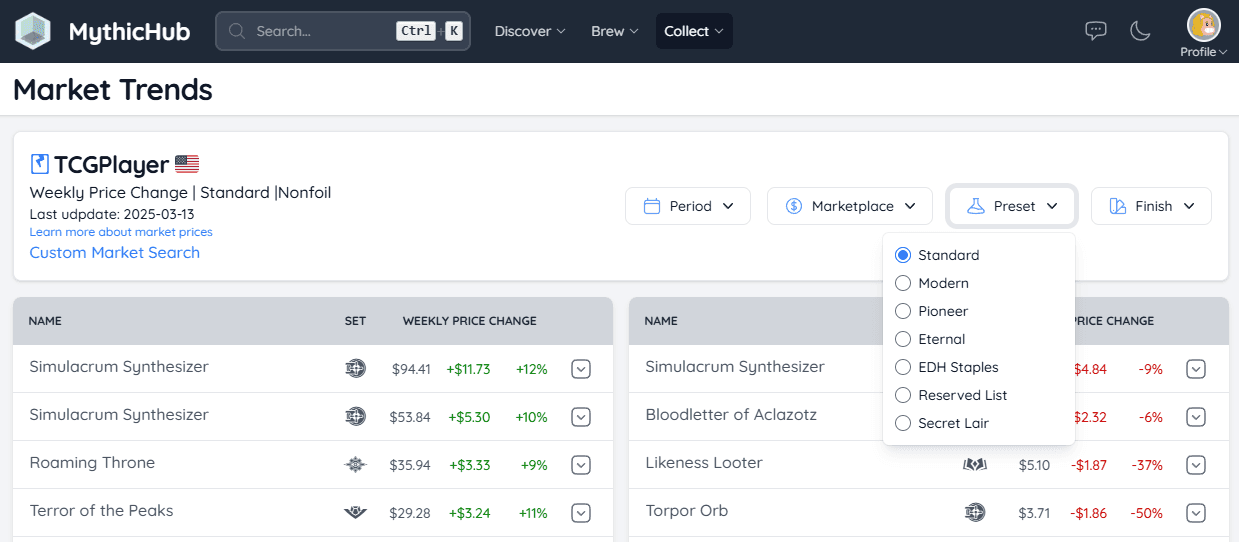
This timing element is crucial for budget building - sometimes waiting a few weeks or buying right after a reprint can lead to substantial savings on cards.
The Preview System: No Surprises
The most important part of the whole system is the preview mode. After you run the optimization, you don't immediately change your deck. Instead, you get a detailed summary showing:
- Which cards would change and what they'd change to
- How much money you'd save (or spend more) on each card
- The total savings for the entire deck
- Cards that couldn't be optimized for your chosen settings
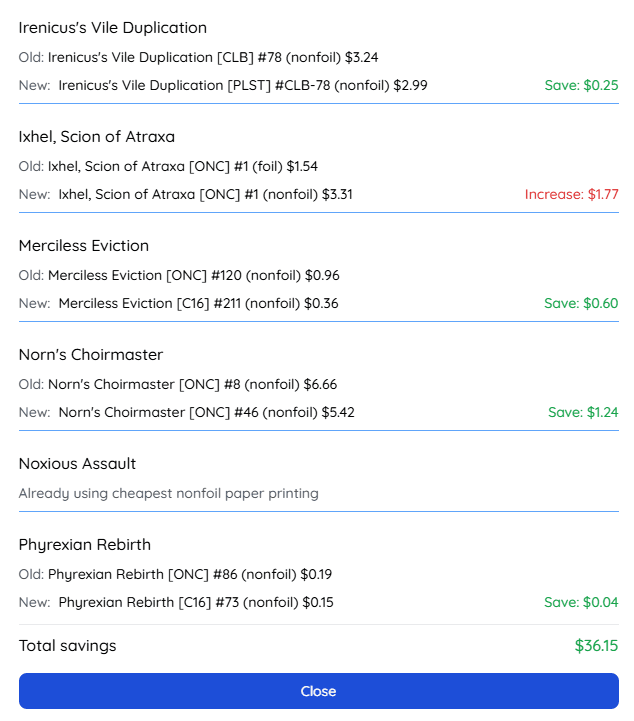
Only after you review everything and decide you like the changes do you apply them. And even then, you enter a preview mode where you can still revert everything back to the original if you change your mind.
This preview system was super important to me because I hate when tools make changes I can't easily undo. Unlike Moxfield where changes happen immediately and you might not even notice what changed, with this approach you always stay in control and know exactly what's happening.
Try It Yourself: Works with Every Type of Deck
One thing I'm really proud of is that this feature works with all the different types of decks on MythicHub, and you can try it right now:
User Decks
When you optimize your own deck, you have full control. You can save the changes permanently, save them as a new deck, or just browse the optimization and revert back.
Try it: Commander deck with real savings potential
Preconstructed Decks
Ever wondered how much a precon would cost if you bought all the cards individually using the cheapest printings? Now you can find out instantly. This is super useful for deciding whether to buy the precon or build it yourself.
Try it: Compare sealed vs singles pricing
Tournament Decks
See that tournament deck that just won an event? Import it and immediately see what the budget version would cost you. While many competitive tournaments are proxy-friendly, most casual playgroups prefer real cards, so this helps you build those decks affordably for your local game nights.
Try it: See what a tournament deck actually costs with cheaper printings
Just click the "Optimize" button on any of these decks and play around with the settings. You might be surprised by how much money you can save just by being smart about which printings you choose.
Collection Status Integration
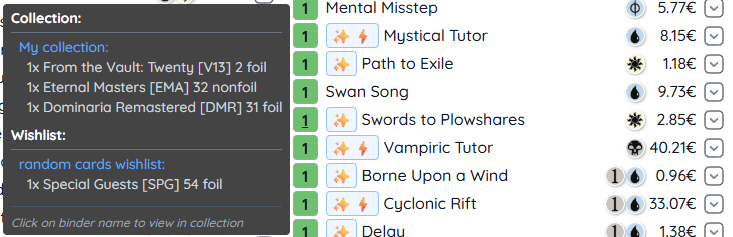
Once you have an optimized deck in preview mode, all of MythicHub's collection features still work perfectly. The enhanced deck builder shows your collection status for each card (green for exact matches, blue for partial matches, white for missing cards) and even hover over cards to see which binders contain them.
This integration makes the whole planning process seamless. You can optimize a deck, see what you still need to buy, add missing cards to your wishlist, and track their prices over time.
Additional Budget Building Tips
While finding cheaper printings is one of the biggest money-savers, here are some other strategies that work well alongside the optimization tools:
Prioritize Your Upgrades
Not every card needs to be the expensive version. Think about which cards matter most to you personally and which ones are just functional pieces. Maybe you want your commander to be a specific printing because you love the artwork, or perhaps there's a key combo piece where you prefer the original frame. Focus your budget on these meaningful upgrades and use cheaper printings for everything else.
The optimization tool makes this easy - you can run it with different settings to see how much you'd save by using budget versions for most cards while keeping expensive versions for your favorites. This approach lets you build a deck that feels special to you without breaking the bank.
Build and Upgrade Over Time
One of the smartest approaches to deck building is starting with a functional budget version and improving it gradually. Use the cheapest printings to get your deck playable right away, then upgrade individual cards over time when you find good deals or when your budget allows.
The collection and wishlist features make this strategy really effective. Add the expensive versions you eventually want to your wishlist, track their prices over time, and buy them when they drop or when you have extra spending money. This way you can enjoy playing your deck immediately while slowly building toward your ideal version.
This approach also helps you figure out which cards actually need upgrading - sometimes you'll discover that the budget version of a card works perfectly fine, and you can spend that upgrade money elsewhere.
Final Thoughts
Building this feature reminded me why I love working on MythicHub. It's not just about creating another tool - it's about solving real problems that Magic players face every day. The cost of this game can be a real barrier, and if I can help people build the decks they want to play for less money, that feels really meaningful.
I've used this feature myself dozens of times when planning new deck builds, and it's saved me significant amount of money. More importantly, it's helped me build decks I might not have otherwise considered because I thought they were out of my budget.
If you try out the optimization feature, I'd love to hear about your experience. Did you find any surprising savings? Are there any features you'd like to see added? You can reach out through the feedback form or email me directly at matt(at)mythichub.com.
Thanks for reading, and happy deck building!