Optimize Your Wishlist Across 6 Different Marketplaces

One of MythicHub's most popular features just got better. The price optimization tool that helps you find cheaper card printings now works with wishlist binders. You can optimize your wishlists across 6 different marketplaces, making sure you're always getting the best deals on the cards you plan to buy.
The Wishlist Problem
If you're like me, you probably keep a wishlist binder for cards you want to buy eventually. Maybe it's upgrades for existing decks, cards for a brew you're planning, or just staples you want to own. The problem is that when you add cards to your wishlist, you often pick the first printing you see, which might not be the cheapest version available.
I found myself doing this all the time. I'd be browsing a deck online, see a card I wanted, and add it to my wishlist without thinking about whether there's a cheaper printing. Then when I'd go to actually buy the cards, I'd realize I could have saved a lot of money by choosing different printings.
Another common scenario is creating a wishlist and letting it sit for a few months while you wait for the right time to buy. During that time, cards get reprinted in new sets, Commander decks, or special products. Suddenly, cards that were $20 when you added them might have $5 versions available, but your wishlist is still showing the old expensive printing.
This adds up fast when you have dozens or hundreds of cards in your wishlist. You might think you need $500 to buy everything, but with cheaper printings, it could be closer to $350. That's a real difference.
The Solution: Optimize Your Wishlist
The price optimization feature has been working great for decks for a while now (you can read more about that in this blog post), but I wanted to bring the same power to wishlists. Now you can click one button and see exactly how much you could save by switching to more budget-friendly printings.
The best part is you get full control over what changes. Just like with deck optimization, you can preview everything before applying any changes. No surprises, no unwanted modifications.
How It Works
Using the wishlist optimization is simple:
Step 1: Open Your Wishlist
Navigate to any wishlist binder you own. At the top of the binder, you'll see an "Optimize" button next to the other binder actions.
Step 2: Choose Your Preferences
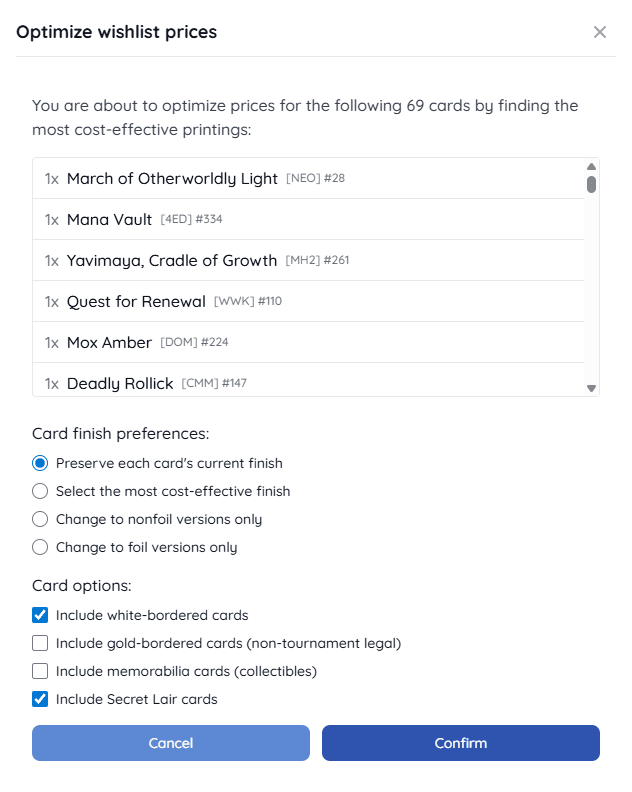
When you click "Optimize," you'll see a dialog with several options:
Finish Options:
- Select the most cost-effective finish - Picks the cheapest option, whether it's foil or nonfoil
- Preserve each card's current finish - Keeps your current foil preferences while finding cheaper printings
- Change to nonfoil versions only - Forces everything to nonfoil for maximum savings
- Change to foil versions only - Makes everything shiny (usually more expensive, but sometimes older foils are actually cheaper!)
Card Options:
- Include white-bordered cards - White borders are often much cheaper but some players prefer to avoid them
- Include gold-bordered cards - These aren't tournament legal but work great for casual play
- Include memorabilia cards - Special collectible versions that might not fit all collections
- Include Secret Lair cards - These limited edition printings, which can sometimes be cheaper or more expensive depending on the card
Step 3: Review the Results
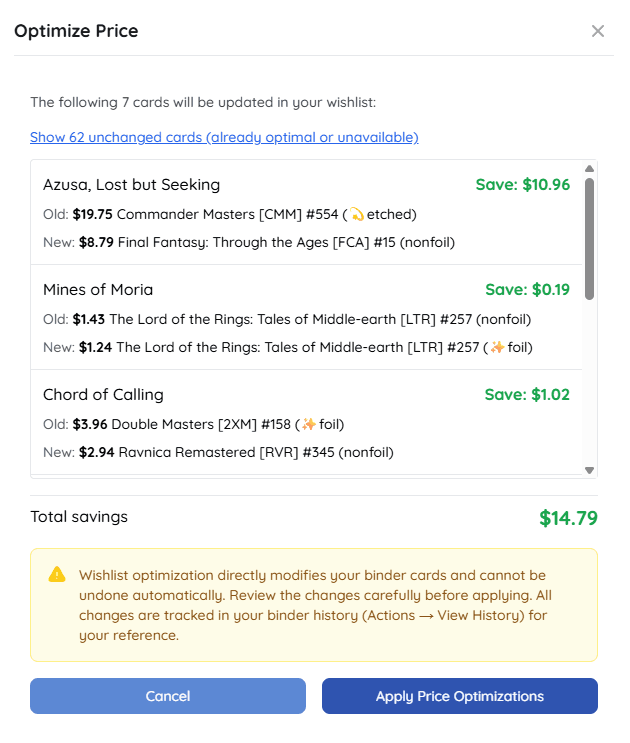
After clicking "Confirm," you'll see a detailed summary showing:
- Every card that can be optimized
- The original printing and price vs. the optimized printing and price
- How much you'd save (or spend more) on each card
- The total savings for your entire wishlist
- Cards that are already at the best price
- Cards where your preferred finish isn't available
Step 4: Apply the Changes
If you like what you see, click "Apply Price Optimizations" and your wishlist will be updated with the more affordable printings.
Important: Unlike deck optimization which lets you preview and revert changes, wishlist optimization directly modifies your binder cards and cannot be undone automatically. Make sure you review the summary carefully before applying.
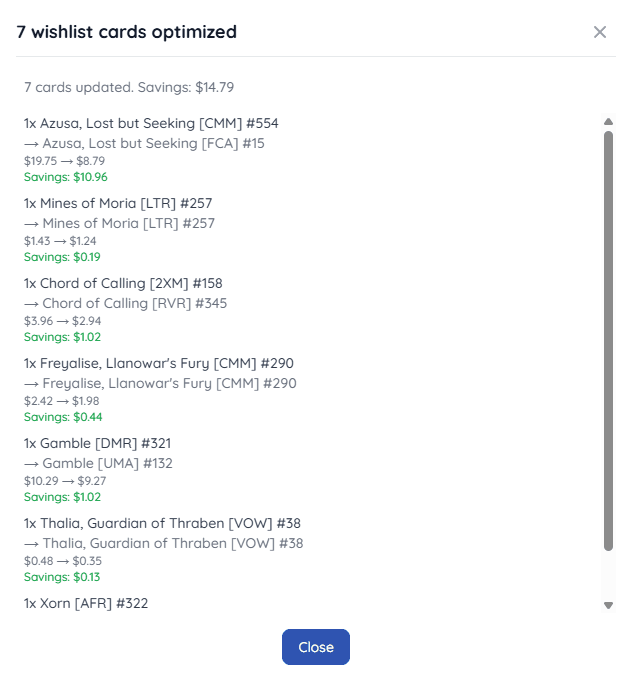
That said, all changes are tracked in your binder history with a complete summary of what was changed. If you want to check the original printings after optimization, you can view the full details by clicking on your binder's Actions menu and selecting "View History." This gives you a record of every card that was changed, including the before and after printings and prices.
Six Marketplaces, One Tool
One of the best parts about this feature is that it works across all the marketplaces MythicHub supports:
- TCGplayer - The largest US marketplace
- Cardmarket - Popular in Europe with prices in EUR
- Card Kingdom - Known for quality and customer service
- Mana Pool - Great alternative US marketplace
- Cardsphere - Perfect for traders
- Cardhoarder - For MTGO collections
Each marketplace has different prices and availability, so optimizing your wishlist for your preferred marketplace ensures you're getting the best deals where you actually shop.
Bulk Buying Your Wishlist
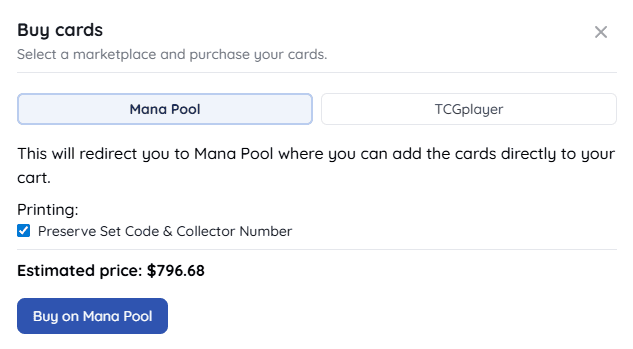
Once you've optimized your wishlist, you can easily purchase the cards in bulk. At the top of your wishlist binder, there's a "Buy Cards" button that lets you add multiple cards to your cart at once. Currently, this bulk buying feature works with TCGplayer and Mana Pool, both of which support mass entry.
When you click "Buy Cards," you can choose your preferred marketplace and select options like preserving specific set codes and collector numbers or excluding cards you already own in your collection. The dialog shows you an estimated total price and redirects you to the marketplace with all your cards ready to add to your cart.
For other marketplaces like Cardmarket, Card Kingdom, Cardsphere, and Cardhoarder, you'll need to purchase cards individually. Just click the dropdown menu (actions) on each card in your wishlist and select "Buy" to open that card's listing on your chosen marketplace.
Works for Decks Too
If you haven't tried the price optimization feature for decks yet, it's definitely worth checking out. You can optimize user decks, preconstructed decks, and even tournament decklists. The great thing about deck optimization is that it works on any deck, even if you don't own it or aren't logged in. You can preview the changes and decide later if you want to apply them.
Wishlist optimization is different. Since it directly modifies your binder cards, you need to own the wishlist binder to optimize it. If you want to try the optimization feature without creating an account first, test it on any deck to see how it works. Once you're comfortable with the process, create an account and a wishlist to optimize your own cards.
Deck optimization also includes collection awareness, so it can skip cards you already own and only optimize what you need to buy. Read more about deck optimization in my detailed blog post about finding cheaper printings.
Real Savings Example
I tested this on my own wishlist and the results were impressive. I had a wishlist of about 60 cards that I thought would cost around $400 based on the printings I had selected. After running the optimization with nonfoil preference and including white-bordered cards, the total dropped to about $280. That's $120 in savings just by being smart about which printings to buy.
Not every wishlist will see savings that dramatic, but even saving 15-20% adds up over time, especially if you're regularly buying cards.
Give It a Try
If you have a wishlist binder in MythicHub, I encourage you to try the optimization feature. Here's how to get started:
- Go to your wishlist binder (or create one if you don't have one yet)
- Click the "Optimize" button at the top
- Select your preferences
- Review the results
- Apply the changes if you like them
The worst case scenario is that you discover your wishlist is already optimized and you're getting good prices. The best case is that you find hundreds of dollars in savings you didn't know were available.
Looking Forward
This feature is part of my ongoing effort to help Magic players get the most value from their collections and make the game more affordable. Price optimization for wishlists was one of the most requested features after I launched deck optimization, so I'm really happy to finally deliver it.
I have more improvements planned for the optimization system, including better handling of different card conditions and more granular control over set preferences. If you have ideas for what you'd like to see next, please share them.
Your Feedback Matters
I'd love to hear about your experience with wishlist optimization. Did you find significant savings? Were there any features you wished it had? Any issues or confusion?
You can reach out through the feedback form or email me directly at matt(at)mythichub.com. Your input helps shape what I build next.
Thanks for reading, and happy collecting!