Pick Your Favorite Art for a Deck Cover

While working on the deck builder and making it more and more complete, there was still one feature that MythicHub was missing: the option to set a deck cover. I am happy to say that this is now possible.
Magic has so much great card art, and many cards have several very different printings. I wanted deck covers to let you choose both the card and the exact artwork you like.
The cover art appears on deck components in Personal Decks and Community Decklists. It is also used as the page header background when you open the deck. The artist's name is shown with the background image, so the artwork is properly credited.
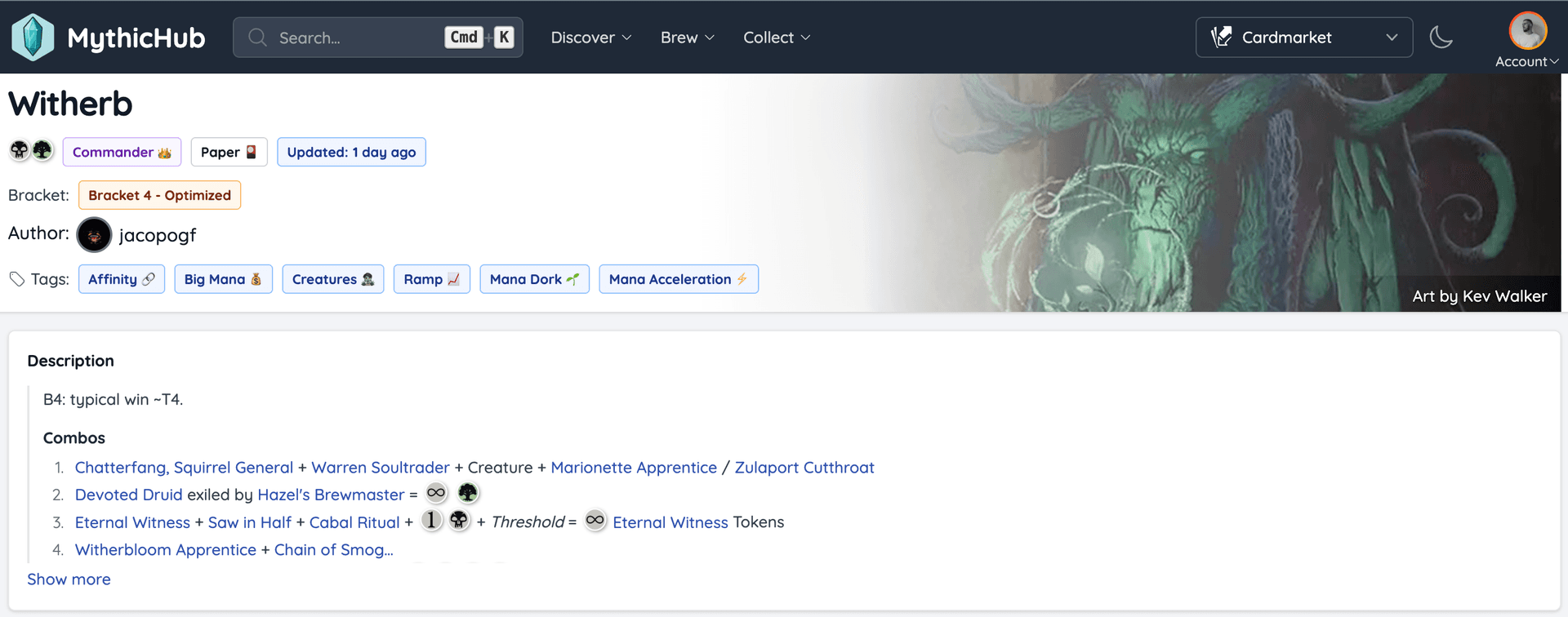
The default deck cover
You do not have to choose a cover yourself. MythicHub selects one automatically when a deck does not have a custom cover.
For Commander decks, it uses the commander when one is available. If a deck has a companion, that is the next choice. Otherwise, MythicHub picks a card from the main deck. This gives every deck a cover without any extra setup, and you can leave it as it is if you like the automatic choice.
Choosing your own cover
If it is your deck, click Change cover art near the artwork credit to choose something else. The first option lets you choose from cards that are already in the deck. Select a card, check the preview, and click Use as cover art.
But you can also use any card you want. It does not need to be part of the deck. Click Search all cards, find a card, and MythicHub will show all of its available printings. You can then choose the exact artwork you want to use.
Maybe the card fits the theme but did not make the final list. Maybe you simply love the art. Either way, why not make it the face of the deck?
There is also a quick option for cards already in the deck. Open a card, go to Actions, and select Use as deck cover. This uses the current printing of that card right away.
This is a small visual change, but I like how it makes decks easier to recognize when browsing a longer list.
Happy brewing!