Mana Pool Partnership, Collectr Import, and Collection Import Improvements

I'm excited to share some fantastic updates to MythicHub that expand your options for tracking prices and importing your Magic: The Gathering collection! This update brings a brand new marketplace partnership with Mana Pool, a new import source for Collectr users, and intelligent improvements to the collection import process that will save you time and frustration.
These additions continue my commitment to making MythicHub the most flexible and user-friendly collection management tool available, giving you more choices and better tools to manage your cards exactly the way you want.
Mana Pool Marketplace Integration
I'm thrilled to announce that MythicHub is now partnering with Mana Pool! This fantastic marketplace is now fully integrated into MythicHub, and it's already featured on our homepage's market trends section, giving you another excellent option for tracking your collection's value and finding great deals on Magic cards.
Here's what you can do with Mana Pool integration:
- Track Market Trends: Browse daily, weekly, monthly, and quarterly price changes for cards across different formats and finishes. I've already gathered about a month of price data, so you can start exploring trends right away! You can see Mana Pool price trends right on the MythicHub homepage.
- Set Mana Pool as Your Price Source: When creating new binders or updating existing ones, you can now select Mana Pool as your marketplace. This means all your collection values will be based on Mana Pool's pricing.
- View Price History: Check individual card price history on Mana Pool to see how values have changed over time.
- Create a Wishlist and Bulk Buy: Create a wishlist, add cards you want to purchase, and use the bulk buy button to buy everything at once from Mana Pool.
Mana Pool is a great marketplace for buying and selling Magic cards, and I encourage you to check them out at manapool.com. Having more marketplace options means more opportunities to find the best deals and track your collection's value accurately across different platforms.

Import Your Collection from Collectr
Another exciting addition is support for importing collections from Collectr, the popular portfolio tracking app for trading card games. If you've been using Collectr to manage your Magic collection, migrating to MythicHub is now incredibly easy!
Importing from Collectr Help Page
Why Choose MythicHub for Free Collection Management?
Collectr is a well-designed app that many collectors use successfully. However, if you're looking for a completely free alternative with no subscription required, MythicHub might be the perfect fit for your needs.
Here's what sets MythicHub apart as a free MTG collection manager:
No Subscription Required - While Collectr offers a PRO tier at $4.99/month for features like in-depth pricing data, advanced filters, and data export capabilities, MythicHub provides all features completely free. There are no premium tiers, no paywalls, and no feature restrictions.
Free Data Export - Your collection data belongs to you. On MythicHub, you can export your collection data anytime, for free. Unfortunately, Collectr requires a PRO subscription to export your own collection, which can make it difficult to back up your data or migrate to other platforms.
Everything You Need, Always Free:
- Import and export unlimited collections without any cost
- Access all features including advanced filtering, price tracking, and analytics
- Track unlimited cards across unlimited binders
- View comprehensive price history and market trends
- No ads, no subscriptions, no hidden costs
I built MythicHub with the philosophy that your collection data belongs to you, and you should never have to pay to access or export it. That's why importing and exporting will always be completely free on MythicHub.
How to Import from Collectr
Importing from Collectr is straightforward:
- Export your collection from Collectr (requires Collectr PRO subscription for the export feature)
- In MythicHub, navigate to your Collection page
- Click "Import Collection"
- Select "Collectr" as your import source
- Upload your CSV file and configure your binder settings
- Let MythicHub process your collection!
The importer handles card quantities, conditions, finishes, and other details to give you an accurate representation of your collection in MythicHub.

How Collectr Cards Are Matched to MythicHub's Database
MythicHub uses a sophisticated matching process for Collectr imports:
TCGPlayer Set Matching - Collectr exports use TCGPlayer's set naming convention, which MythicHub maps through TCGPlayer group IDs to identify the correct printings.
Card Matching - Individual cards are matched by name (with automatic cleanup of alternate art prefixes) and collector number (handling variants like "239" matching to "239a" for double-faced cards).
Important Note - While the import system is highly accurate, not all cards may match perfectly due to set name differences between Collectr, TCGPlayer, and Scryfall, or collector number format variations (like "277/306" in The List reprints). Cards with alternate artwork or special treatments may occasionally match to a different version.
After importing, you'll see a summary of successfully imported cards and any that couldn't be matched. Unmatched cards can be added manually, and the list remains in your binder history for reference.
Smarter CSV Import Validation
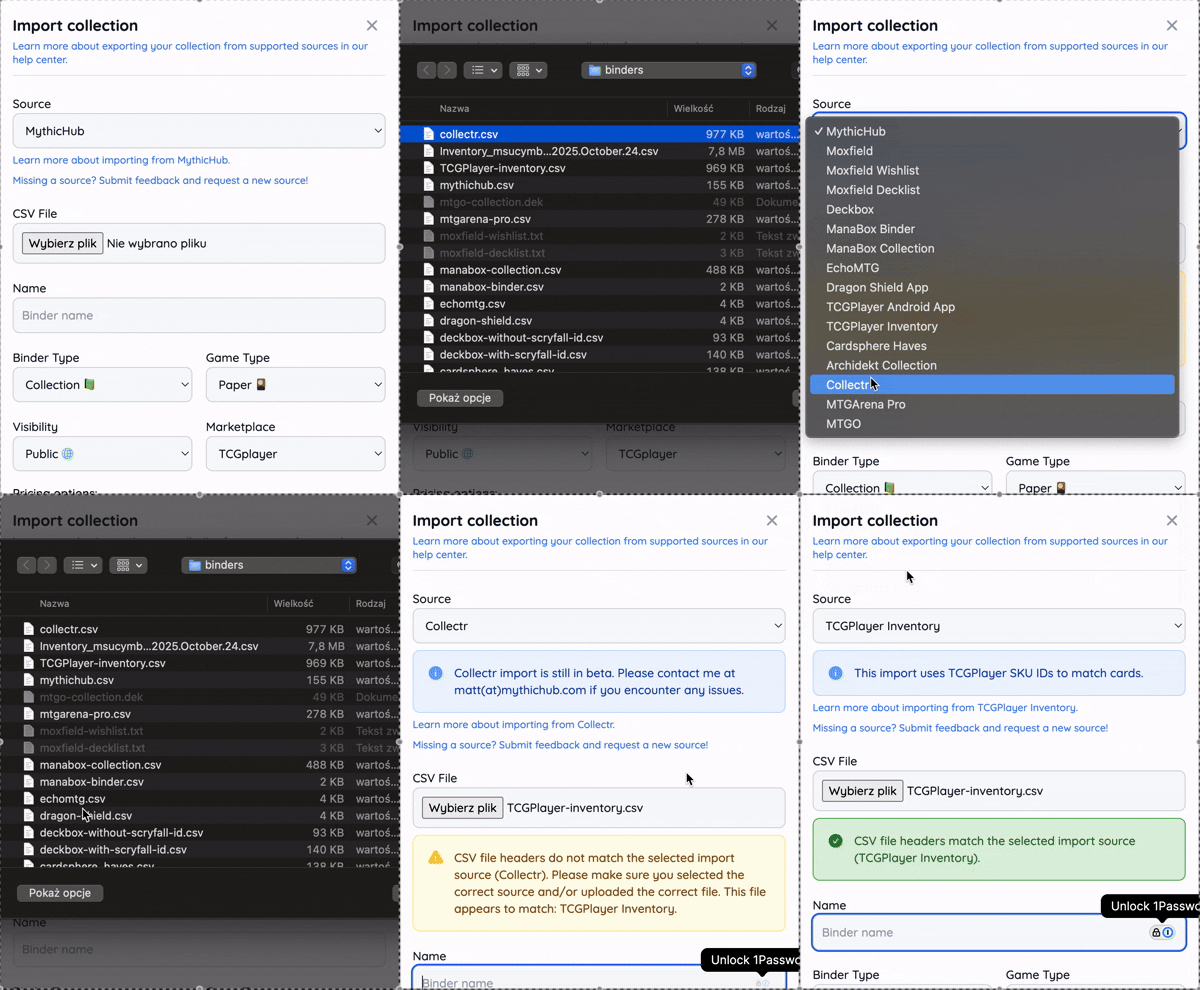
I've been analyzing usage patterns and noticed that users were sometimes uploading CSV files but then selecting the wrong import source. This could lead to failed imports or incorrect data mapping, which was frustrating for everyone.
To fix this, I've added intelligent CSV validation that automatically checks your uploaded file and suggests the correct import source!
Here's how it works:
When you upload a CSV file in the import dialog, MythicHub now:
- Reads the file headers to understand the structure
- Compares them against known import sources (Moxfield, Deckbox, Archidekt, Dragon Shield, Collectr, etc.)
- Shows you a helpful alert indicating whether the file matches your selected source
- Suggests alternative sources if your file appears to match a different platform
This means you'll get instant feedback like:
- ✅ "CSV file headers match the selected import source (Moxfield)."
- ⚠️ "CSV file headers do not match the selected import source (Deckbox). This file appears to match: Archidekt."
This simple improvement prevents import errors before they happen and helps you navigate the import process with confidence. No more guessing which source to select or wondering why your import failed!
What's Next?
These updates represent my ongoing effort to make MythicHub more accessible, more powerful, and more user-friendly. Whether you're tracking prices across multiple marketplaces, switching from another platform, or importing a large collection, I want the process to be as smooth and intuitive as possible.
I'm constantly working on new features and improvements based on your feedback. If you have suggestions for additional marketplaces to integrate, import sources to support, or other features you'd like to see, I'd love to hear from you!
Get in Touch
If you have questions, feedback, or suggestions for future updates, you can reach me at matt(at)mythichub.com or through our feedback form.
You can also connect with MythicHub on Facebook and Instagram for updates and announcements.
Happy collecting and happy brewing!
—Mateusz