Binder Updates: Group By, Deck Usage, and Better Filters

For this release I decided to work on a binder improvement I had been thinking about for a long time.
One part of it was binder filtering. The current binder view already shows useful overview data like totals, binder value, and value trend over time. It is also easy to change sorting (for example by price or by weekly price change) to quickly spot important cards. But filtering the binder in a simple way was still harder than I wanted. The advanced filters are powerful, but they are a bit hidden when you only want to do something simple, like see cards from one set.
That is why I added Group by and also improved the filter UX in general.
The second problem I wanted to solve was deck usage in binder view. You could already see deck usage for a single binder card in the card dialog, but that only helps one card at a time. A question I got often was: "How do I see cards in my binder that are not used in any of my decks?" This update solves that too. You can now filter and sort binder cards by deck usage.
Binder Group By
In the binder toolbar, next to the filters, there is now a Group by button.
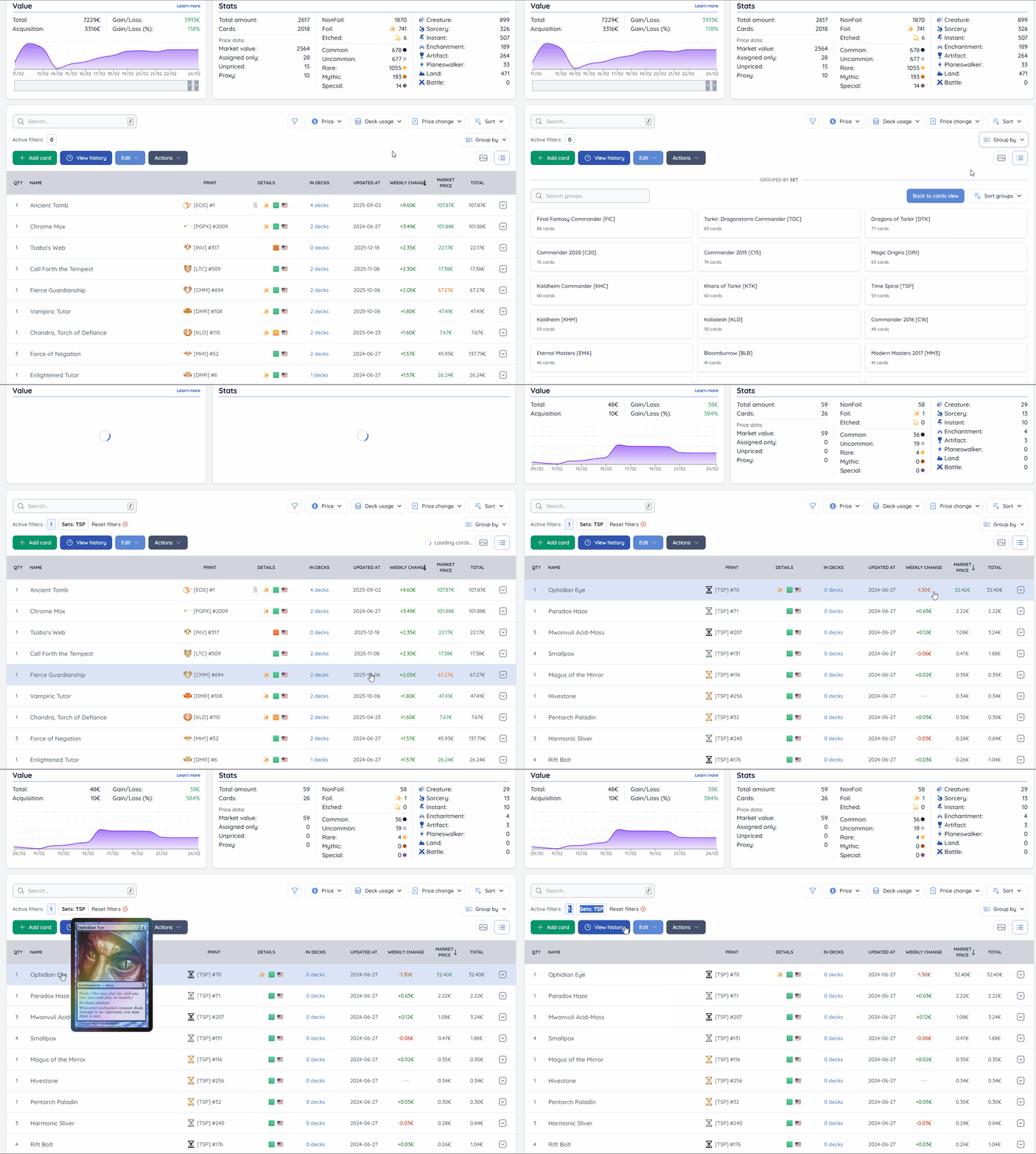
You can group cards by:
- Set
- Rarity
- Type
- Artist
- Finish
- Condition
- Language
- Promo type
After selecting one option, the binder switches to grouped view. Instead of card rows, you will see groups with card counts. This makes it much easier to understand what is inside your binder before you start filtering.
Grouped view also has a few useful controls:
- Search groups
- Sort groups (by name or number of cards)
- Pagination for larger binders
Clicking a group applies that group as a filter and returns to the normal card list view. Grouped results also respect your currently active filters, so if you already filtered the binder first, grouping will only show results from that filtered subset.
Better Active Filter Summary
Previously, it was hard to see which filters were active. You mostly had the reset button, but not a clear summary of what was currently applied.
Now there is an Active filters section that shows:
- the number of active filters
- a short preview of active filters
- an expandable detailed list of all active filters
This gives better visibility and makes it easier to understand why a binder shows a specific result set.
Cards Deck Usage
As mentioned above, one common question was how to find cards that are not used in any decks yet.
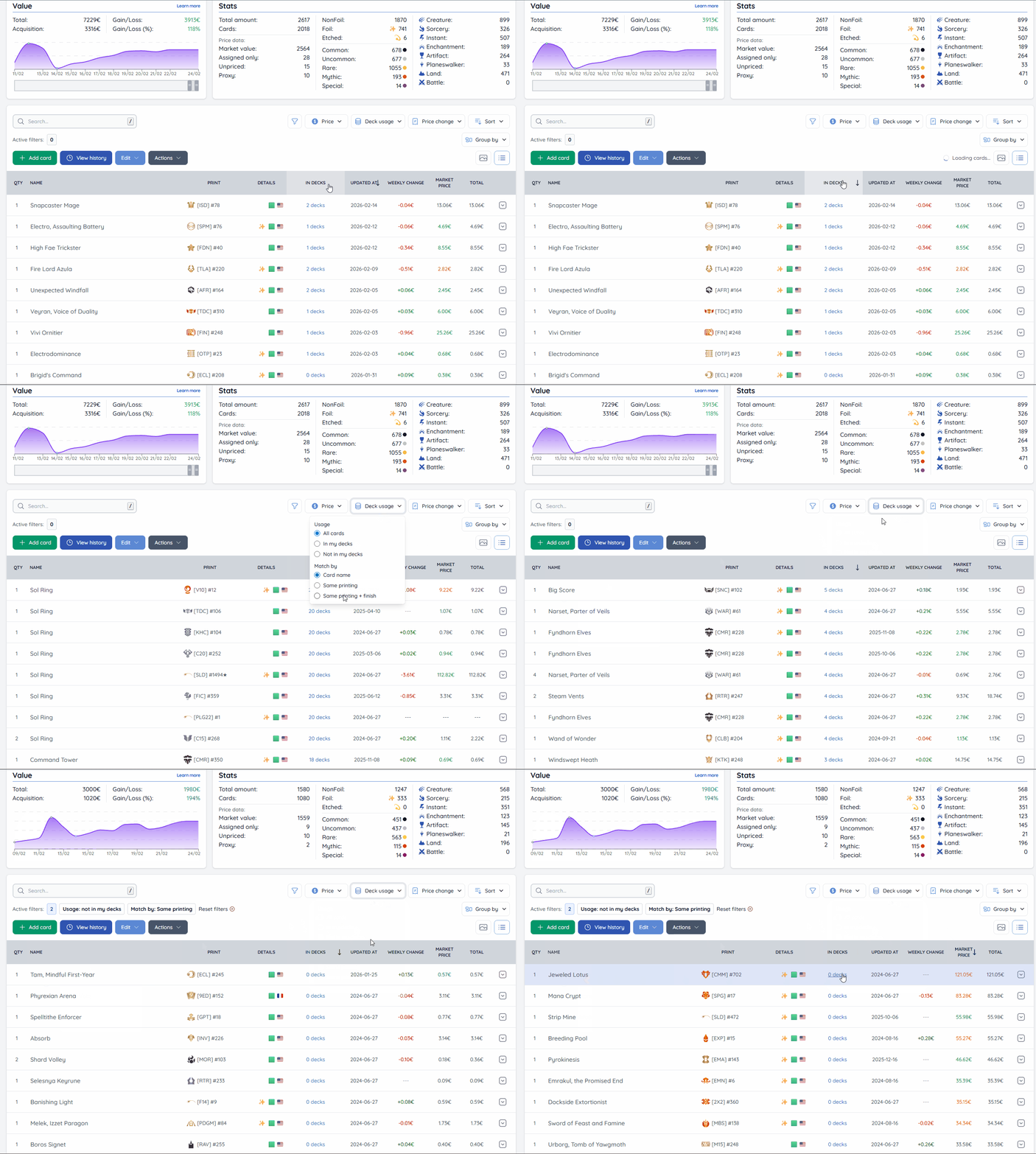
There is now a new Deck usage filter in the binder filters (available for your own binders). It supports:
- All cards
- In my decks
- Not in my decks
There is also a new Deck usage sorting option, so you can sort cards by how many of your decks use them.
Match by (how deck usage is calculated)
Deck usage matching can mean different things depending on how strict you want it to be.
Example: if you have a Sol Ring from one printing in your binder, but your deck uses a Sol Ring from a different printing, should that count as "used" or not? Different people will prefer different answers.
To handle this, the Deck usage filter includes a Match by option:
- Card name (default)
- Same printing
- Same printing + finish
By default, MythicHub matches by card name, so any Sol Ring in your decks will count. If you want stricter matching, you can switch to the same printing, or the same printing plus finish.
Small note
Deck usage filters are only available on your own binder view (not when viewing someone else's binder or when using binder compare), because this data depends on your personal decks.
Thanks
I am always looking for ways to improve and expand MythicHub. If you have suggestions for additional improvements or features, let me know!
Happy collecting!