Binder Improvements: Matching Cards, Deck Usage, and Deduplication

I'm excited to share a set of binder improvements that make it easier to understand your collection and plan decks. Inside the binder card dialog you will now find two new tabs: Matching cards and Deck usage. I also added a guided Deduplicate Cards dialog that helps you quickly merge duplicate entries in a safe way.
Matching cards inside the binder card dialog
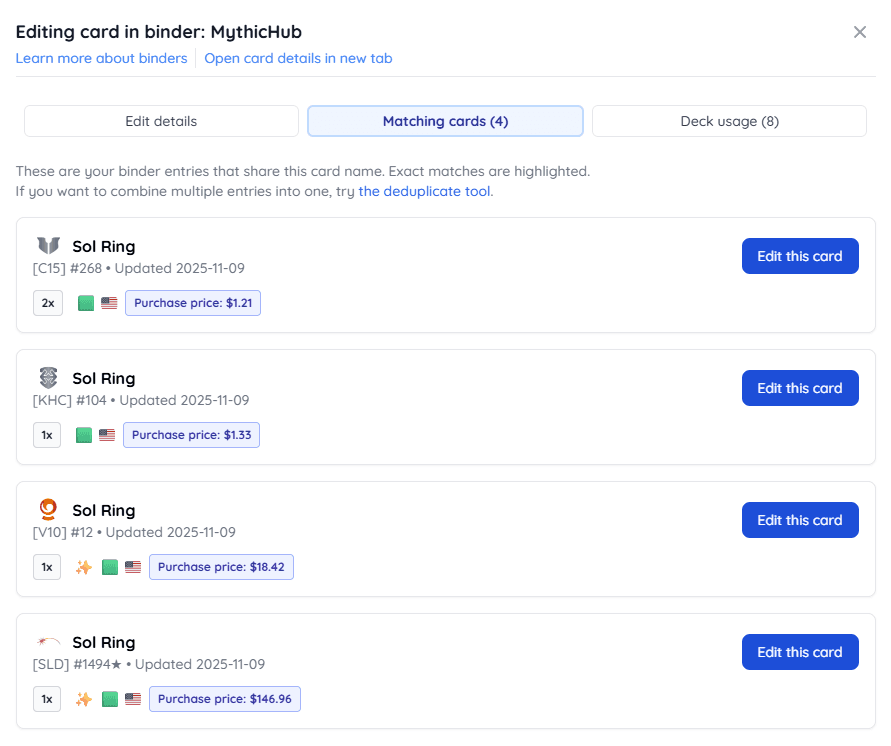
The Matching cards tab lists other entries from the same binder that share this card's name. This is useful when you own multiple printings or finishes of the same card.
What you will see (current binder only):
- Exact printing highlighted: the exact set, collector number, finish, and language are marked clearly
- Quick edit: jump straight to any matching binder entry and open it in the same dialog
- Amount, finish, language, and notes shown for each match
- Assigned price shown when present; the label matches your binder type and marketplace
- A shortcut to open the Deduplicate tool if you want to collapse duplicates into one entry
This makes it simple to see how many copies you own across different printings and to clean up duplicate rows without leaving the dialog.
Deck usage inside the binder card dialog
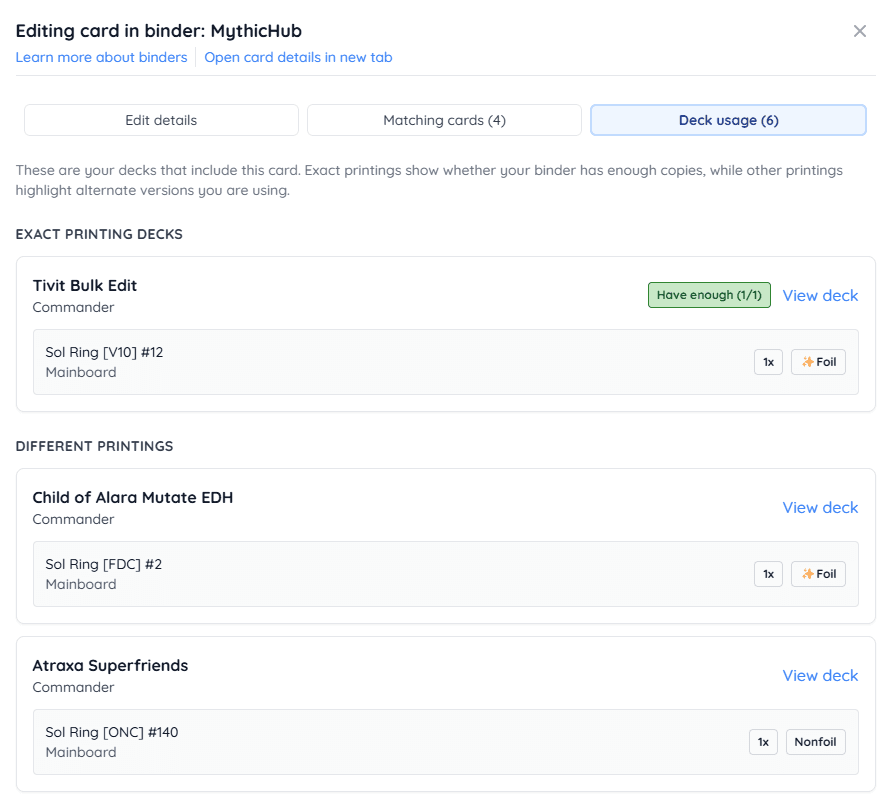
The Deck usage tab shows your decks that use this card, grouped into two sections:
- Exact printing decks: decks that use the exact same printing, finish, and language
- Different printings: decks that use the same card but a different printing, finish, or language
When a deck uses the exact printing, the dialog compares how many copies the deck needs vs how many you have on this single binder entry and shows a clear badge:
- Have enough (X/Y)
- Need N more (X/Y)
You can open any deck in a new tab to review details. Each deck shows the individual cards, amounts, roles (commander, mainboard, sideboard), finish, and language. Deck usage lists all occurrences of the card regardless of its role. This helps spot double booking and plan swaps when a single copy is referenced by multiple decks.
Deduplicate Cards dialog
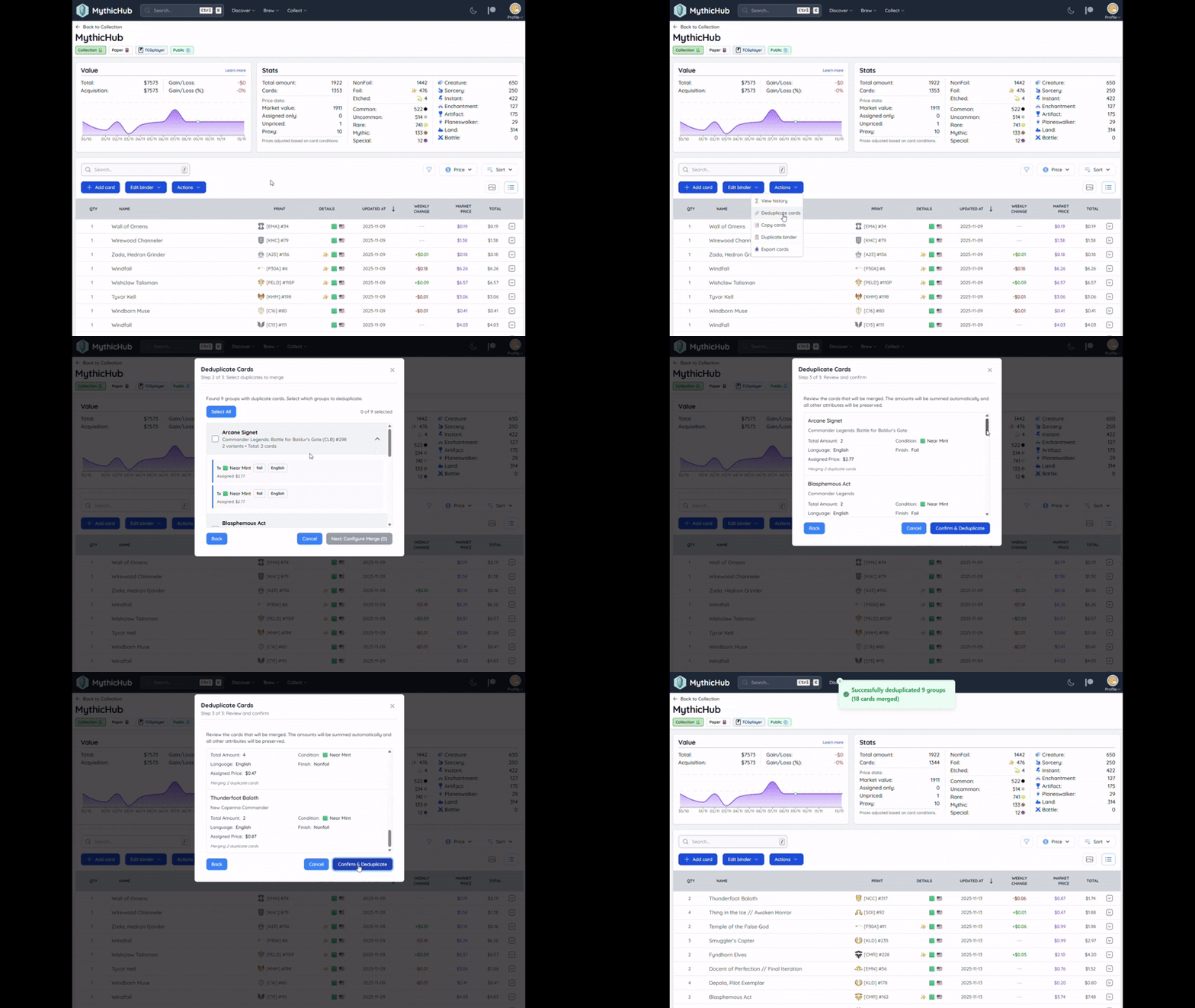
Sometimes a binder ends up with duplicate entries for the same printing and configuration. The new Deduplicate Cards dialog guides you through a simple three step flow:
- Learn the rules: a short overview of what gets merged and what will stay
- Select groups: preview duplicate groups and choose which ones to merge
- Review and confirm: check the final amount and details, then merge
How duplicates are grouped:
- Same card printing (same multiverse card), same condition, language, finish, and the same extra info fields
How merging works:
- All amounts are summed into one target entry
- Notes and assigned price are inherited from the first card in the group and cannot be changed during the dedup process
- Remaining duplicate rows are removed
- A history entry is recorded so you can audit the change later
You can open Deduplicate from the Matching cards tab or from binder actions. It is designed to be safe, clear, and quick.
Why this matters
- Know your counts: see all printings you own for a card in one place
- Plan your decks: check if you have enough exact copies for each deck without switching pages
- Avoid double counting: catch when multiple decks rely on the same physical copy
- Keep binders tidy: merge duplicates with confidence and keep a clear history of changes
Try it and share feedback
Open any card in your binder and switch between Matching cards and Deck usage. If you spot duplicate rows, try the Deduplicate Cards dialog. I would love to hear how this works for you and what could be improved next.
Questions or feedback? Reach me at matt(at)mythichub.com or through feedback form.