Deckbuilder Update: Bulk Edit and Deck History

I wanted to add the same kind of history system we already have for binders to decklists for a long time. I had one major blocker though: the old bulk edit tool. That is why this release gives us both at the same time: a complete rewrite of Bulk Edit and a new Deck History log.
The old bulk edit was more or less a placeholder. It worked, but it was always quite limited. It expected you to know the exact decklist text format MythicHub uses, and as the deckbuilder kept getting more customization options like tags, highlight colors, proxy status, and notes, all of that had to somehow survive inside one big decklist string.
There was also a bigger technical problem behind it. The old bulk edit basically replaced the whole deck with a new one every time you saved. That made proper history logging very hard. If the full decklist gets replaced, it becomes much harder to tell which exact card row changed, which one was deleted, and which one was only updated.
So I decided to rebuild Bulk Edit first.
Bulk Edit as a real editor
My goal for the new Bulk Edit page was simple: I wanted it to feel more like editing a spreadsheet and less like fighting with a text import box. You should be able to see the whole deck at once, make many changes in one place, review them, and save only when you are ready.

The new Bulk Edit page is a full table-style editor for one deck. You can:
- change quantities
- replace cards
- switch printings
- move cards between mainboard, sideboard, and maybeboard
- edit finish and language
- update tags, proxy status, highlight colors, and notes
- duplicate rows
- mark rows for deletion and restore them before saving
One thing I especially wanted here was a staged draft workflow. Nothing is saved immediately. You can work on many changes at once, and the real deck only updates after clicking Save changes. This makes larger updates much safer.
I also added a bottom batch toolbar, so you can select many rows and apply changes in bulk. This is very useful for things like changing finish, language, board, tags, proxy status, or highlights across many cards at once.
Another important part is the new Paste decklist flow. You can now paste a list into Bulk Edit and choose whether to replace the current draft or append to it. That means you can start with a pasted list and then continue cleaning it up directly in the table instead of going back and forth between tools.
To make the page easier to read, new, updated, and deleted rows are clearly marked before you save. There are also draft counters for added, updated, and deleted rows, so it is easy to understand what your save will actually do.
In short, Bulk Edit is no longer just a fallback tool. It is now a proper deck management page for bigger changes.
Deck History log
Once Bulk Edit stopped replacing the whole decklist, the way was finally open for Deck History.
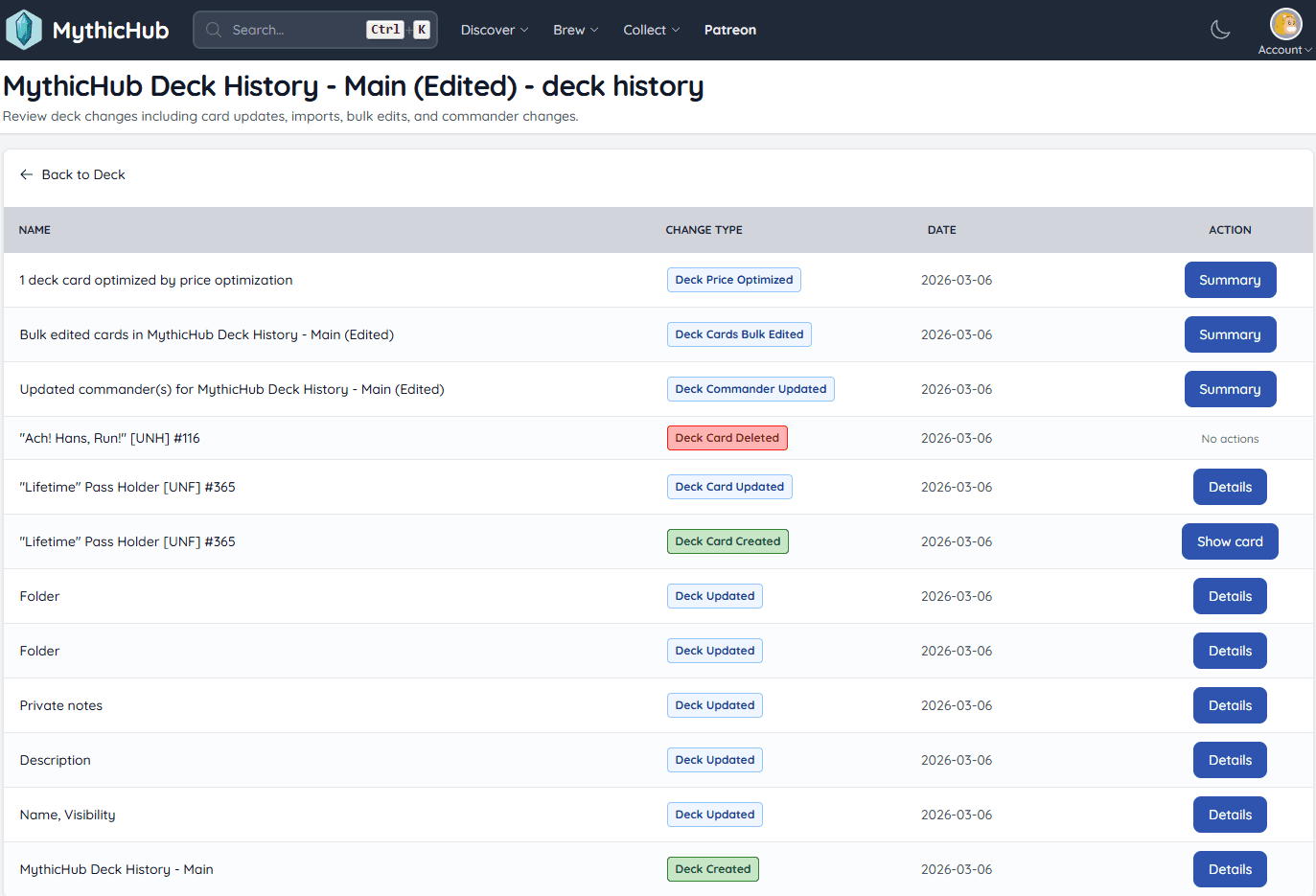
If you already used binder history, this will feel very familiar. Deck History records what changed, when it changed, and gives you a much better audit trail for your decklists.
The new history page tracks several kinds of changes:
- deck updates like name, format, visibility, folder, tags, notes, and other settings
- single card add, edit, and delete actions
- Bulk Edit saves as grouped summary entries
- deck imports, including the original imported decklist text
- commander updates
- deck price optimization changes
This part was very important to me: history entries should be readable by humans, not only by the database. So for example, if you change a card printing, the history shows a clear print label like set name, set code, and collector number.
Bulk Edit is where this becomes especially useful. If you make a larger update, the history does not just say that the deck was replaced. Instead, it shows a summary of how many rows were added, removed, and changed. That makes it much easier to understand what happened later, especially if you edit the same deck often.
Imported decklists are also tracked in a more useful way now. The history entry can keep the full imported text, so if you ever want to check what exactly was pasted or imported, you can review it later.
Deck History is owner-only. Some deck data can be private, and I wanted to keep that safe. The history log is there to help you understand your own changes, not to expose private details to other users.
Why these two features belong together
This update is really about making deck management feel more reliable.
Bulk Edit gives you a better way to make many changes. Deck History gives you confidence that those changes are actually tracked in a useful way. For me, these two features solve one bigger problem together: making decklists easier to maintain over time.
This matters even more if you use MythicHub as more than just a place to store one finished deck. Many of us keep several decks at once, test new cards, move cards around, compare printings, import lists from other places, and slowly tune things over weeks or months. At that point, being able to both edit cleanly and look back at changes becomes very valuable.
I have wanted this kind of workflow in MythicHub for a long time, so I am very happy to finally get it out.
Thanks
I am always looking for ways to improve and expand MythicHub. If you have suggestions for additional deckbuilder improvements or history features, let me know.
Happy brewing!